Timesheet and Payroll Management System
PRECISION IN EVERY PAYCHECK. Innovative HR System
A fully customised employee timesheet, attendance & payroll management platform, built for multi-branch organisations with geo-verified clock-in and real-time oversight.
Innovative HR is a bespoke web-based system managing employee attendance, timesheets, and payroll across multiple branches. Built on PHP & MySQL with a responsive Bootstrap frontend, it works on any device. The system uses geo-location verified clock-in, so staff can only log attendance when physically at their assigned location.
System Concept & Architecture
Multi-Branch Setup
- Add unlimited branch locations with GPS coordinates (latitude & longitude)
- Assign staff members to specific branches via the Super Admin panel
- Each branch operates independently within the same centralised system
Geo-Location Verification
- Staff login triggers a location check against stored branch coordinates
- Access is only granted if password is correct and location matches
- Unauthorised access attempts are blocked with a clear alert message
- Regional & Training Managers get an extended permitted radius
Three-Tier Access
- Staff / Employee: personal attendance and timesheet access
- Store Manager / Head Teacher: branch-level staff oversight
- Owner / Super Admin: full control across all branches
Staff & Employee Dashboard
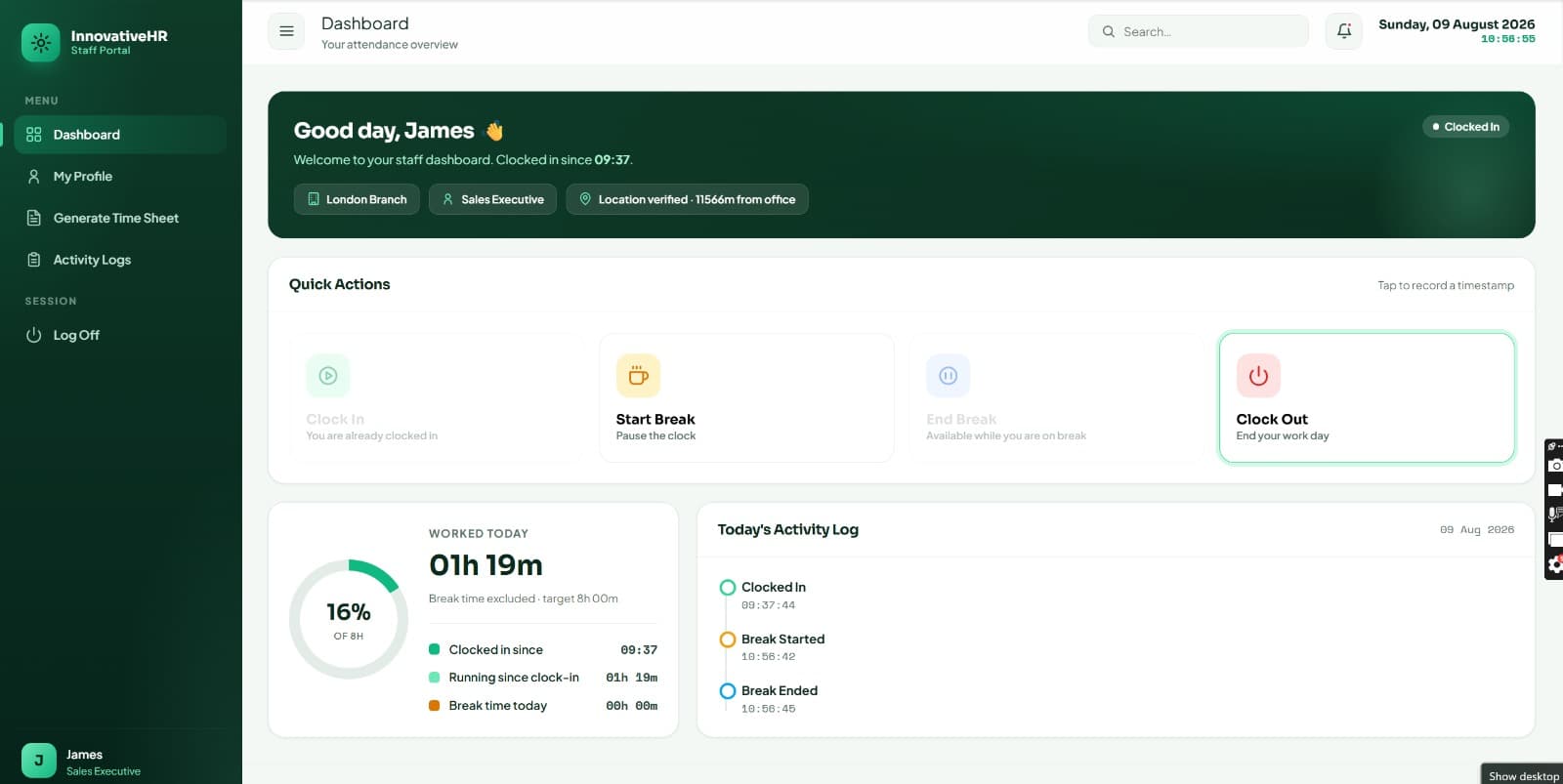
Daily Actions: Attendance Tracking
- Clock-In: once inside allowed branch premises, staff log in and press Clock-In to begin their shift
- Start Break: when taking lunch or any other break, staff press Start Break to pause working time
- Return Break: on returning to work, staff press Return Break so the system resumes tracking
- Clock-Out: at end of shift, staff Clock-Out before leaving; total work hours are saved automatically
Activity Log
- Every action is timestamped and recorded automatically
- Full day-by-day activity log maintained per employee
- Staff can view their own current day's complete timeline
Staff Reports
- Employment Information summary
- Timesheet Summary by date range
- Hourly Rate & Salary breakdown
- Leaves & Absences history
- Miscellaneous reports & search
Fully Functional & Tested Screens
All screens in this proposal are live, working screens rather than mockups. The system is in active development and is ready for a demo session. Modifications and enhancements are welcomed after feedback.
Store Manager / Head Teacher Dashboard
Staff Overview
- See all employees of the assigned branch with live current status
- View last action and timestamp for every staff member
- Know instantly who is clocked in, on break, or clocked out
Leave & Absence Management
- Mark any staff member as On Leave or Absent from the dashboard
- Update employee contact details: address, email, phone
- Set staff status to Active or Blocked; only Active accounts can log in
Timesheet Generation
- Generate timesheets for any individual staff member on demand
- Select any date range: weekly, monthly, or custom period
- Auto-calculates: hours worked × hourly rate = salary amount
- Day-by-day breakdown with full clock-in / break / clock-out detail
“Store Managers can see the last status of any staff member at any moment, whether clocked out, on break, or actively working, along with the exact timestamp of their last recorded action.”
Innovative HR, Manager Dashboard Feature
Owner / Super Admin Dashboard
Full Organisational Control
- Manage all employees across every branch from one unified dashboard
- Live counters: Total Branches, Total Employees, Active, Blocked, Clocked-In, On Leave, On Break, Absent
- Broadcast HR notifications visible on all employee dashboards simultaneously
- Assign and manage all user IDs and login credentials organisation-wide
Branch & Employee Management
- Add new branches with GPS coordinates for geo-verification
- Add employees and assign them to specific branches
- Set individual hourly rates per staff member
- Manage all leave types across the organisation
Payroll & Timesheets
- Generate timesheets for an individual, a branch, or all branches at once
- View full activity logs across the entire organisation
- Export timesheets as PDF with authorised signature line
- Overtime and holiday hour calculations included
Timesheet Reports: Weekly, Monthly or Custom
Each timesheet includes: employee name, ID, store location, date range, day-by-day status, clock-in time, break period, clock-out time, hours worked, hourly rate, and total salary, all exportable as a branded PDF with authorised signatures.
Overtime Approval Workflow
Extra Hours Approval
- Any hours beyond the standard 8-hour threshold are flagged automatically
- Extra hours must be approved by a Manager before counting in payroll
- Prevents unauthorised overtime from inflating salary calculations
Internal Messaging
- Built-in Inbox for every user account
- HR can push notifications visible on all employee dashboards
- Account settings and profile management per user
My Balance
- Each employee can view their own leave balance and entitlements
- Salary history and hourly rate records accessible at any time
- All standard leave types configurable by Super Admin
Timeframe & Investment
Phase 1: Development
- 3 months of initial development already completed before demo
- Full customisation, testing & deployment: 4 weeks after terms agreed
- Additional scope may extend the timeline accordingly
Phase 2: Ongoing Support
- Dedicated post-deployment support to keep the system running smoothly
- Report development and system modifications handled on an ongoing basis
- Long-term support contract available, with duration and terms agreed upon signing
Cost Structure
- Phase 1 (one-time fee): A fixed development & deployment investment; final quote provided after requirements are confirmed
- Phase 2 (recurring): A competitive monthly fee covering ongoing support, maintenance & updates, agreed upon contract signing
- Web Hosting: Annual server hosting available on UK or US based infrastructure, with the region selected according to client preference and compliance requirements
Real Screens, Not Mockups
A look inside Innovative HR — from the staff dashboard to payroll reporting.